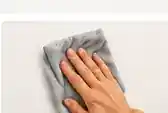
1
Prep your wall
Choose a clean, smooth, dry surface compatible with the mounts. Follow the supplied preparation directions.
Your hanging guide
Everything you need to mount your PicPanels with confidence.

Foam PicPanels
Five easy steps using the adhesive PicPanels mounts and mini level included with your order.

Choose a clean, smooth, dry surface compatible with the mounts. Follow the supplied preparation directions.
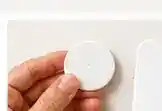
Use the included circular or elongated adhesive PicPanels mounts as indicated for your panel size.
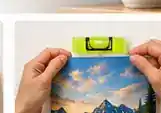
Hold your PicPanel where you want it and use the included mini level to align it.

Press each mounting point firmly, following the included adhesive mount instructions.

Step back and enjoy your frameless display once the mounting instructions have been completed.
Protect your wall: Adhesive performance and removal depend on your wall finish, condition, the mount type and correct installation. Test a suitable hidden area, observe weight limits, and follow the instructions supplied with your mounts. Fresh paint, wallpaper, fragile finishes and textured surfaces may not be compatible.
Ready for a change?
Moving or redecorating? Remove your panel carefully. Circular and elongated mounts may have different removal instructions.

Support the PicPanel and detach it using the instructions for your mount type. Avoid pulling against the paint.

If your elongated mount has a stretch-release tab, pull it in the indicated direction slowly. Do not assume all mounts stretch.

Remove remaining adhesive only as the supplied instructions allow, without scraping painted surfaces.
Paper Posters
PicPanels posters are delivered unframed. Display yours as-is, or add a standard-size frame for a polished, finished look.
Shop Paper Posters
A standard-size frame is an easy way to finish and protect your artwork.
Frames are optional and sold separately.
Frequently asked questions
Quick answers to help you hang with confidence.
Clean, smooth, dry, structurally sound surfaces are generally preferred. Painted, textured, delicate or recently finished walls require extra care. Check the supplied mount instructions before installation.
Do not assume a removed adhesive mount can be reused. Replace single-use adhesive mounts before rehanging and follow the included instructions for your specific mounting type.
Load limits vary with the mount configuration, wall surface and installation method. Use the weight limits supplied with your order. Contact us if you are unsure.
They are designed for clean removal on appropriate surfaces when used correctly, but no adhesive product can guarantee zero damage on every surface. Test first and follow the removal instructions for your mount type.
Choose a frame to match the printed poster's dimensions, add an optional mat, insert the print and attach appropriate hanging hardware. Frames are not included with paper posters.